MiniTool Partition Wizard Professional 13 is Here!

Disk management is one of the most critical tasks for any Windows user — and doing it wrong can result in data loss, system instability, or wasted storage space. MiniTool Partition Wizard 13 is one of the most powerful and trusted partition management tools available in 2025, offering a complete set of tools to create, resize, merge, split, clone, and manage disk partitions safely and efficiently — all without needing any technical expertise.
In this in-depth review we cover everything you need to know about MiniTool Partition Wizard 13 Full Version — from its comprehensive partition tools and major new features to system requirements, editions, pros, cons, and our honest final verdict.
1. What is MiniTool Partition Wizard 13 Full Version?
MiniTool Partition Wizard 13 is the latest major version of MiniTool Solution Ltd’s professional disk partition management software for Windows. Version 13 represents a significant leap forward from previous releases — bringing a redesigned interface, new AI-assisted disk management tools, and a range of new features that make it the most capable MiniTool Partition Wizard release to date.
Unlike Windows’ built-in Disk Management tool which is limited in functionality, MiniTool Partition Wizard 13 provides a comprehensive, safe, and feature-rich alternative that handles even the most complex partition scenarios — including resizing system partitions, converting partition styles, cloning entire disks, and migrating Windows to a new SSD — all without data loss.
MiniTool Partition Wizard 13 is the most advanced version of the popular partition manager — featuring a redesigned interface, AI disk optimization, over 30 partition tools, OS migration, full disk clone, MBR/GPT conversion, disk benchmark, and bootable media — making it the most complete partition management solution for Windows in 2025.
2. What’s New in Version 13?
MiniTool Partition Wizard 13 introduces the most significant update in the product’s history:
🤖 AI Disk Management Assistant
Version 13 introduces a brand new AI disk management assistant that analyzes your current disk layout, identifies inefficiencies, and provides intelligent recommendations for optimizing your partition structure — helping users get the most out of their storage without needing deep technical knowledge.
🎨 Completely Redesigned Interface
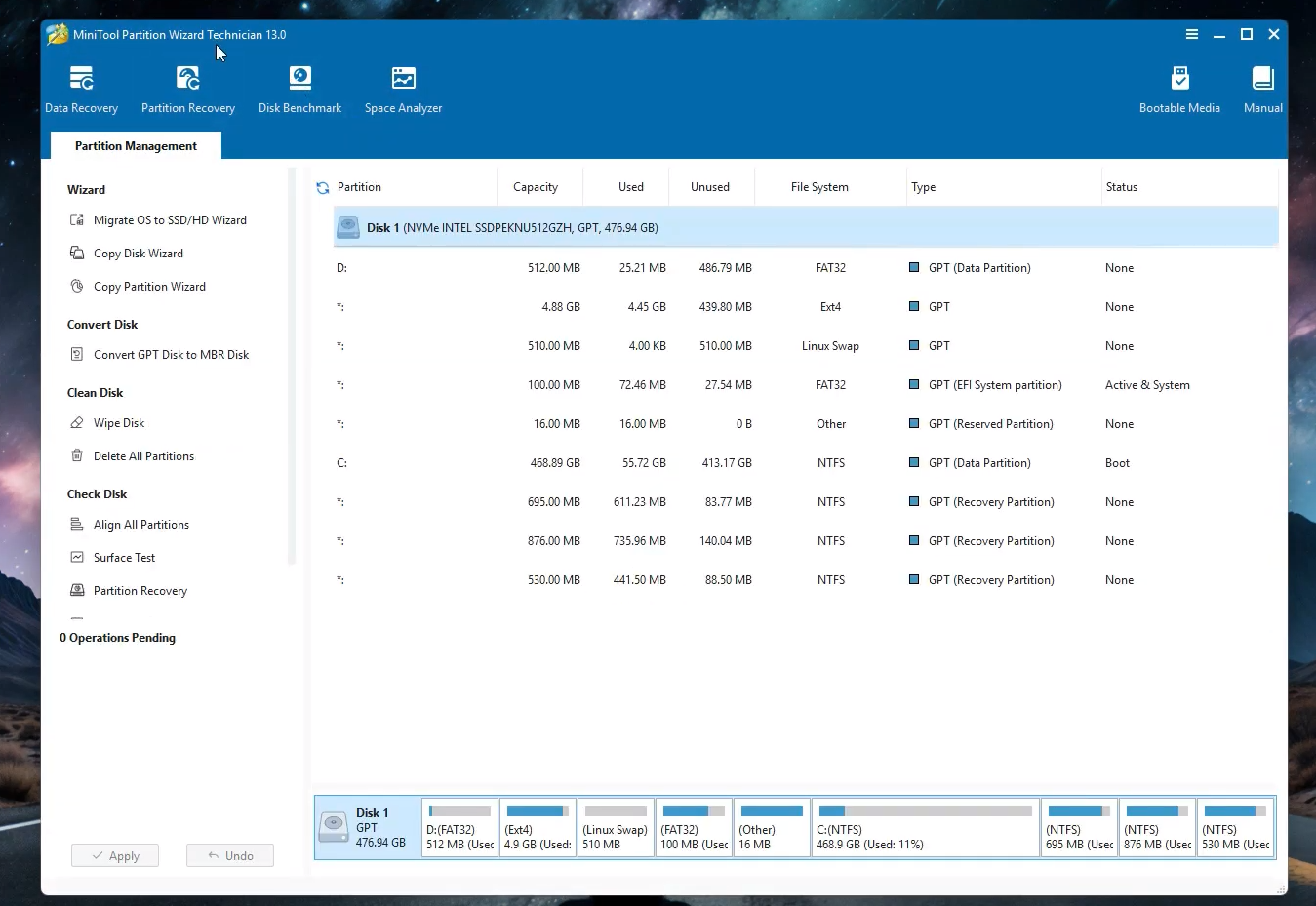
MiniTool Partition Wizard 13 features a fully redesigned modern interface with improved disk map visualization, a cleaner toolbar layout, better operation queue management, and a more intuitive navigation structure — making the tool significantly easier and more pleasant to use compared to version 12.
⚡ Significantly Faster Operations
Version 13 delivers major performance improvements across all partition operations — with resize, move, clone, and migration tasks completing noticeably faster thanks to a rebuilt data processing engine that better utilizes modern multi-core CPUs and high-speed NVMe storage.
💾 Advanced SSD & NVMe Support
Version 13 adds deeper support for the latest NVMe SSDs including PCIe Gen 4 and Gen 5 drives — with improved 4K alignment, better trim command handling, and more accurate health monitoring for modern solid-state storage devices.
🔒 Enhanced Data Protection
Version 13 introduces improved data protection mechanisms including smarter rollback capabilities, better error recovery during interrupted operations, and more comprehensive pre-operation safety checks — giving users greater confidence when performing complex disk management tasks.
3. Partition Tools Included
MiniTool Partition Wizard 13 includes over 30 disk and partition management tools:
4. Key Features of MiniTool Partition Wizard 13
5. Editions Comparison
MiniTool Partition Wizard 13 is available in several editions:
6. System Requirements
Before downloading MiniTool Partition Wizard 13, make sure your system meets these specifications:
| Requirement | Details |
|---|---|
| Operating System | Windows 11 / 10 / 8.1 / 8 / 7 (32 & 64-bit) |
| Processor | 1 GHz or faster CPU |
| RAM | 512 MB minimum (1 GB recommended) |
| Storage | 100 MB free disk space for installation |
| Disk Types | HDD, SSD, NVMe PCIe Gen 4/5, USB, SD Card, RAID |
| File Systems | FAT16, FAT32, exFAT, NTFS, EXT2/3/4, Linux Swap |
| Platform | Windows only (no macOS version) |
7. Pros & Cons
- ✓New AI disk management assistant in v13
- ✓Completely redesigned modern interface
- ✓Significantly faster partition operations
- ✓Over 30 disk and partition tools
- ✓OS migration to SSD built in
- ✓MBR to GPT conversion without data loss
- ✓Free version available
- ✓Bootable WinPE media support
- ✗Windows only — no macOS support
- ✗Some operations require system reboot
- ✗Advanced tools require paid license
- ✗Large clone operations can take time
- ✗Free version lacks OS migration & clone
8. Who Is MiniTool Partition Wizard 13 For?
MiniTool Partition Wizard 13 is the ideal disk management solution for a wide range of Windows users:
Home Users — Need to extend your C: drive or free up disk space? MiniTool Partition Wizard 13’s simple visual interface and new AI assistant make partition resizing safe and straightforward for anyone.
PC Upgraders — Upgrading from HDD to SSD? The OS Migration and disk clone tools move Windows and all your data to the new drive without reinstalling anything from scratch.
Windows 11 Upgraders — Need to convert from MBR to GPT for Windows 11 compatibility? MiniTool Partition Wizard 13 does it safely without any data loss.
IT Professionals — The Technician edition provides a powerful commercial-grade partition toolkit for managing Windows systems and servers across enterprise environments.
Power Users — The disk benchmark, S.M.A.R.T. analysis, bad sector scan, partition recovery, and bootable media tools make MiniTool Partition Wizard 13 a complete professional disk management platform.
🔓 PASSWORD: softdrop.net
1. Copy all files from folder
2. Paste it to installation folder of program.
3. That’s all.
4. Enjoy!
9. Frequently Asked Questions
10. Final Verdict
MiniTool Partition Wizard 13 is the strongest and most capable version of the popular partition manager to date. With a completely redesigned interface, a new AI disk assistant, significantly faster operations, improved NVMe support, and all the powerful tools the software is known for — version 13 is a must-have upgrade for anyone already using MiniTool Partition Wizard and an excellent first choice for new users looking for a comprehensive Windows partition management solution.
Whether you need to extend your C: drive, migrate Windows to an SSD, convert from MBR to GPT for Windows 11, or clone your entire disk — MiniTool Partition Wizard 13 handles every task safely, quickly, and with a level of polish and intelligence that makes it stand out clearly from the competition.
Our Rating: ⭐⭐⭐⭐⭐ (5 / 5) — The best version of MiniTool Partition Wizard yet. Highly recommended for all Windows users who need a powerful, reliable, and intelligent disk partition management solution in 2025.
🙏 I just ask for thank you, that's all.
Install done but unlock advanced features give me