🎛️ Sound Design Plugin
💻 Platform: Windows
🔄 v1.2.0 — Latest
📦 31.63 MB
🎵 VST3
🎨 5 Transform Controls
🎤 Import · Drag-Drop · Record Live
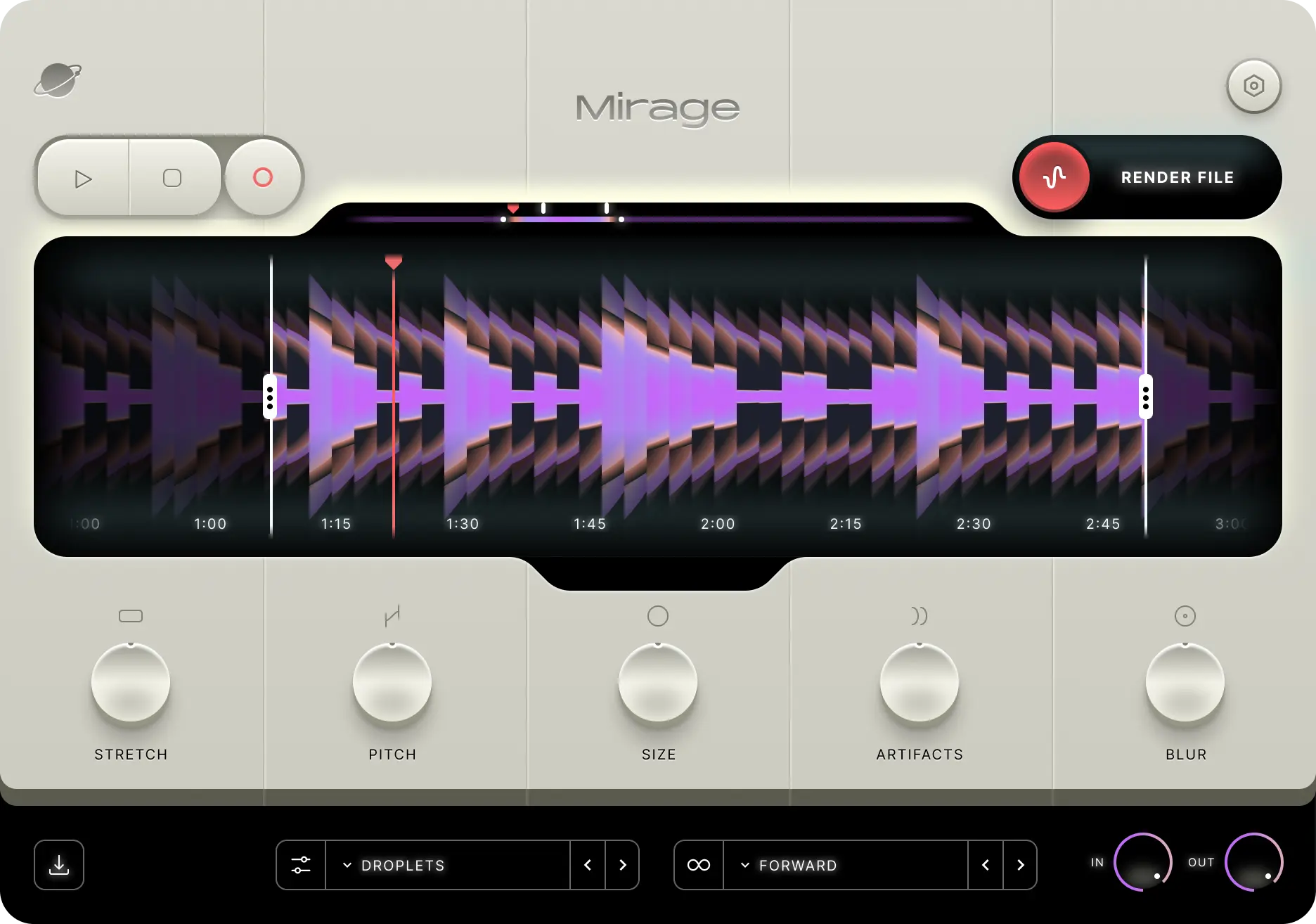
Kepler Audio Mirage is a creative sound design plugin for Windows — inspired by the visual phenomenon it is named after. The design direction draws from shifting desert landscapes, sandstone tones, and the hazy distortions of distant horizons. Custom symbols beneath each control were designed to feel like fragments of a forgotten language — cryptic markings from an imagined ancient civilization. The interface is divided into five distinct sections, creating a sense of rhythm and balance across the layout while supporting the plugin’s workflow. Mirage lets you import, drag and drop, or record live directly into the plugin, and transform even the simplest idea into something cinematic and inspiring. Whether it starts as a rough sketch, a forgotten sample, or complete chaos — Mirage helps you shape it into something beautiful. Made by musicians, for musicians. Available as VST3 for Windows at just 31.63 MB.
💡 Quick Summary
Kepler Audio Mirage Windows v1.2.0 — Creative sound design plugin. 5 transform controls: STRETCH (extend sample up to 100× with fidelity preservation), PITCH (±12 semitones), SIZE (transient smear → atmospheric), ARTIFACTS (granular sounds, grain length linked to Size), BLUR (spectral filter enhancing fundamentals). Input: Import file, drag and drop, or record live directly. Cryptic ancient-civilization-inspired UI. Five distinct interface sections. 31.63 MB. Windows + macOS. VST3. Made by musicians, for musicians.
Five Ways to Shape Your Sound
Mirage gives you exactly five controls — each one a distinct transformation of your audio. There are no menus, no hidden pages, no complex routing. Just five powerful ways to turn any sound into something cinematic on Windows.
⟷
Stretch
Up to 100× length
Controls the length of the sample, extending it up to 100× its original duration while preserving fidelity. Turn a one-second hit into a 100-second atmospheric drone on Windows.
♪
Pitch
±12 semitones
Adjusts the sample’s pitch within a range of ±12 semitones — a full octave up or down. Shift the tonal center of any sound source directly in the plugin on Windows.
〜
Size
Transient → Atmospheric
Smears the transient of the sample, producing a more atmospheric, diffuse, and ambient sound. The more Size applied, the further the attack dissolves into space on Windows.
∷
Artifacts
Granular — linked to Size
Introduces granular sounds into the audio with grain length directly linked to the Size parameter. More Size means longer grains — from subtle texture to dense granular cloudscapes on Windows.
◈
Blur
Spectral Filter
Applies a spectral filter that enhances fundamental frequencies while attenuating the upper harmonic content — smoothing and focusing the tonal character of any sound on Windows.
Three Ways to Get Sound Into Mirage
What You Can Make With Mirage
🌌
Cinematic Atmospheres
Stretch a single chord hit to 100× and blur its harmonics — instant cinematic underscore texture on Windows.
🎵
Ambient Pads
Record a short vocal phrase, apply Size and Artifacts — transform voice into a granular evolving pad on Windows.
🥁
Textural Percussion
Drag a drum hit, smear its transient with Size, add granular Artifacts — turn rhythmic material into atmospheric texture on Windows.
🎬
Sound Design FX
Pitch shift and stretch field recordings — turn footsteps, rain, or wind into cinematic sound design elements on Windows.
🌊
Evolving Drones
Push Stretch to maximum, apply Blur — any sound becomes an evolving, hypnotic drone for ambient or meditative music on Windows.
💡
Sketch Rescue
Import a rough voice memo or unfinished idea and transform it into something polished and inspiring — never waste a sketch again on Windows.
Plugin Format — Windows
🎵 VST3 (Windows)
🍎 AU — macOS only
🍎 VST3 — macOS also available
System Requirements — Windows
| Requirement |
Details |
| Operating System |
Windows (64-bit) |
| Plugin Format |
VST3 |
| Version |
v1.2.0 — latest |
| Installer Size |
31.63 MB |
| Input Methods |
Import file, drag and drop, record live |
| Controls |
STRETCH · PITCH · SIZE · ARTIFACTS · BLUR |
| Also macOS |
macOS — AU + VST3 |
| Developer |
Kepler Audio (kepleraudio.com) |
Pros & Cons
✅ Pros
- ✓Incredibly simple — just 5 controls, infinite results
- ✓Three input methods — import, drag-drop, record live
- ✓Stretch up to 100× with fidelity preservation
- ✓Granular engine (ARTIFACTS) linked intelligently to SIZE
- ✓Spectral BLUR enhances fundamentals for focused tones
- ✓Tiny 31.63 MB installer — instant download
- ✓Unique ancient-civilization inspired UI aesthetic
- ✓Perfect for ambient, cinematic, and sound design work
⚠️ Cons
- ✗Only 5 controls — limited for complex sound design
- ✗VST3 only — no VST2 or AAX support on Windows
- ✗No built-in preset library
- ✗Niche tool — not a general-purpose plugin
Frequently Asked Questions
What is Kepler Audio Mirage for Windows? ▾
Kepler Audio Mirage is a creative sound design plugin for Windows (v1.2.0) — a 31.63 MB VST3 plugin that lets you import, drag and drop, or record audio directly into it and transform it using five controls: STRETCH (extend sample up to 100× while preserving fidelity), PITCH (±12 semitones pitch adjustment), SIZE (smears the transient for atmospheric diffusion), ARTIFACTS (introduces granular sounds with grain length linked to the Size parameter), and BLUR (spectral filter that enhances fundamental frequencies). The plugin is inspired by the visual phenomenon of mirages — its design draws from shifting desert landscapes, sandstone tones, and hazy distortions of distant horizons. Custom symbols beneath each control are designed to resemble fragments of a forgotten language. Made by musicians for musicians. Available as VST3 for Windows and AU + VST3 for macOS.
What does the STRETCH control do in Mirage? ▾
The STRETCH control in Mirage extends the length of the loaded sample by up to 100 times its original duration while preserving the fidelity of the audio. This means a one-second percussion hit can become a 100-second atmospheric drone, a short voice memo becomes a sweeping cinematic texture, and a simple chord stab becomes a slowly evolving ambient pad — all without the digital artefacts and pitch drift that characterize basic time-stretching algorithms. STRETCH is one of the most powerful tools in Mirage for turning short, simple audio sources into expansive, cinematic material on Windows.
How do ARTIFACTS and SIZE work together in Mirage? ▾
In Mirage, the ARTIFACTS and SIZE controls are intelligently linked. SIZE smears the transient of the loaded sample — the more SIZE applied, the more the attack of the sound dissolves into a diffuse, atmospheric character. ARTIFACTS introduces granular synthesis sounds into the audio, and critically, the grain length of those granular sounds is directly controlled by whatever the SIZE parameter is set to. This means that as you increase SIZE to make a sound more atmospheric, the granular ARTIFACTS from the ARTIFACTS control automatically become longer grains to match — creating a coherent relationship between diffusion and granular texture rather than two independent controls that fight each other. The result is an intuitive creative tool where SIZE and ARTIFACTS work together to move a sound from sharp and defined to granular and atmospheric on Windows.
Can I record directly into Mirage on Windows? ▾
Yes — Mirage supports live recording directly into the plugin on Windows. You can connect any microphone or audio interface and record audio straight into the plugin’s audio buffer, then immediately start transforming it with the five controls. This makes Mirage especially powerful for capturing spontaneous ideas — a hummed melody, a tapped rhythm, an ambient room sound — and turning them into cinematic material without ever leaving the plugin window. Combined with the drag-and-drop and file import options, Mirage gives you three completely different ways to get audio into the plugin, making it flexible for any production workflow on Windows.
Download Kepler Audio Mirage Windows full version — v1.2.0, 5 transform controls, 100× stretch, granular artifacts, spectral blur, record live — 31.63 MB!
🙏 I just ask for thank you, that's all.