PSP auralComp 2.0.0 Full macOS is Here!
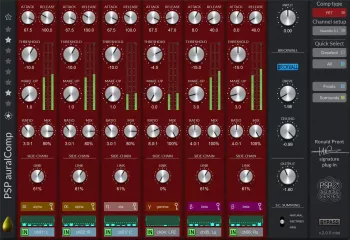
Managing dynamics in immersive and surround audio is one of the most technically demanding challenges in modern music production and post-production — controlling compression consistently across 5.1, 7.1, 7.1.2, 7.1.4, or 9.1.6 channel configurations while maintaining spatial coherence, managing side chain routing intelligently, and keeping the final output under strict peak limits requires a level of multi-channel dynamics control that traditional stereo compressors simply cannot provide. PSP auralComp 2 v2.0.0 for macOS — affectionately nicknamed “Avocado” by its developers — is the definitive answer to this challenge, developed by PSP Audioware in close collaboration with acclaimed immersive audio pioneer Ronald Prent, whose engineering credits include Depeche Mode, Iron Maiden, Rammstein, Def Leppard, Celine Dion, and Richie Hawtin. Version 2.0.0 is the most significant update in auralComp’s history — introducing four distinct compressor types (Opto, FET, VCA, and OldTimer), a favorites preset bar, improved gain reduction metering, and workflow refinements that make it the most powerful and flexible multi-channel compressor and limiter available for macOS in 2026.
In this in-depth review we cover everything you need to know about PSP auralComp 2 v2.0.0 macOS Full Version — from its four compressor types and advanced sidechain architecture to system requirements, editions, pros, cons, and our honest final verdict for macOS audio professionals.
1. What is PSP auralComp 2 macOS Full Version?
PSP auralComp 2 v2.0.0 for macOS is the latest release of PSP Audioware’s industry-leading multi-channel compressor and limiter plugin — available as an Audio Unit (AU), VST3, and AAX plugin for macOS, compatible with Logic Pro, Pro Tools, Ableton Live, Nuendo, Reaper, and all other major macOS DAWs. Designed from the ground up for surround and immersive audio workflows, auralComp 2 provides up to 16 channels of compression per multi-channel input bus with individually adjustable parameters, advanced channel grouping for simultaneous adjustment of multiple channels, Quick Select configurations supporting every immersive format from stereo and Mid-Side through 5.1, 7.1, 7.1.2, 7.1.4, and 9.1.6 with a single click, eight individual sidechain submixes with advanced filtering for complex immersive routing scenarios, an output brickwall limiter for precise peak control, and — new in version 2.0.0 — four distinct compressor types that give macOS engineers the character and flexibility to choose the compression style that best suits their material.
Developed in partnership with Ronald Prent — the immersive audio engineer who co-designed the only multichannel analog compressor ever built (the multichannel API 2500) — PSP auralComp 2 brings genuine analog multi-channel dynamics expertise to the macOS plugin format, delivering a compressor that sounds big, warm, and open on Dolby Atmos beds, surround busses, and even stereo material with equal effectiveness.
PSP auralComp 2 v2.0.0 macOS is the definitive multi-channel compressor and limiter for immersive audio — featuring 4 compressor types (Opto, FET, VCA, OldTimer), up to 16 channels per bus, Quick Select for 5.1 through 9.1.6 immersive formats, 8 individual sidechain submixes with advanced filtering, Mid-Side stereo processing, output brickwall limiter, channel grouping, 3 summing methods, A/B comparison, favorites preset bar, improved GR metering, AU / VST3 / AAX plugin formats, co-designed with Ronald Prent, authorized on up to 3 Macs, and a 30-day free trial available for macOS in 2026.
2. What’s New in auralComp 2.0.0 for macOS?
🎛️ Four Compressor Types — Opto, FET, VCA, OldTimer
The most significant addition in PSP auralComp 2.0.0 is the introduction of four distinct compressor types — each with its own character, response behavior, and sonic personality, giving macOS engineers the flexibility to choose the compression style that best suits their immersive material. The default Opto type (now displayed in navy blue) delivers the smooth, musical, program-dependent compression response of optical compressors — warm and natural for orchestral, ambient, and dialogue-heavy Atmos beds. FET (red) offers the fast, punchy, aggressive response of FET-based hardware — ideal for drums, percussion busses, and energetic surround content. VCA (black) provides the precise, tight, controlled compression of VCA designs — perfect for technical mastering and broadcast delivery. OldTimer (grey) delivers vintage character with musical harmonic coloration — adding warmth and personality to immersive mixes that benefit from analog-style processing.
⭐ Favorites Preset Bar
auralComp 2.0.0 introduces a favorites preset bar — allowing macOS engineers to save and instantly recall their most-used compressor settings, channel configurations, and sidechain routing setups with a single click. This is particularly valuable in immersive audio workflows where complex per-format configurations — such as a specific 7.1.2 Atmos bed compression setup or a 5.1 surround bus configuration — need to be quickly recalled and applied across multiple sessions without rebuilding from scratch each time.
📊 Improved Gain Reduction Metering
Version 2.0.0 adds gain reduction indication to the output limiter stage — providing macOS engineers with clearer visual feedback on how much limiting is being applied at the output stage in addition to the per-channel compressor gain reduction metering. This makes it easier to monitor the complete dynamics processing chain at a glance and make informed decisions about the balance between compression and limiting across complex multi-channel immersive sessions on macOS.
🔄 Workflow Refinements
auralComp 2.0.0 delivers numerous workflow improvements for macOS — including an updated operation manual, improved UI responsiveness, better preset management, and refinements to the channel grouping system that make simultaneous multi-channel parameter adjustment more intuitive. The default Opto compressor type’s panel color has been updated from graphite to navy blue for clearer visual identification of the active compressor type — making it faster to orient yourself when switching between the four compressor characters during immersive mixing sessions on macOS.
🔗 Advanced Sidechain Architecture
While present in the original auralComp, version 2.0.0 refines the eight individual sidechain submix system — one of auralComp’s most powerful and distinctive features for macOS immersive engineers. The sidechain architecture allows complex routing scenarios that are essential in immersive audio — for example, configuring ceiling channels to respond only to front channel content, excluding the LFE from triggering overhead compression, or having rear channels listen partially to the center channel’s dynamics. These configurations are automatable in compatible macOS DAWs, giving engineers dynamic control over sidechain behavior across the timeline of immersive productions.
3. Four Compressor Types Explained
PSP auralComp 2.0.0 introduces four distinct compression characters for macOS immersive engineers:
4. Key Features of PSP auralComp 2 macOS
5. Editions Comparison
PSP auralComp 2 v2.0.0 is available in the following options for macOS:
6. System Requirements — macOS
Before downloading PSP auralComp 2 v2.0.0 for macOS, make sure your system meets these specifications:
| Requirement | Details |
|---|---|
| Operating System | macOS 10.13 High Sierra or higher (macOS 14 Sonoma / 15 Sequoia recommended) |
| Processor | Apple Silicon (M1/M2/M3/M4) or Intel Mac — Universal Binary |
| Plugin Formats | Audio Unit (AU), VST3, AAX (Pro Tools) |
| RAM | 4 GB minimum (8 GB+ recommended for immersive sessions) |
| Storage | 69 MB for installation |
| DAW Compatibility | Logic Pro, Pro Tools, Ableton Live, Nuendo, Reaper, Bitwig, and all AU/VST3/AAX macOS DAWs |
| Authorizations | Up to 3 computers per license |
| Version | v2.0.0 Universal Binary (Apple Silicon + Intel) |
| Developer | PSP Audioware (pspaudioware.com) |
| Platform | macOS and Windows (this article covers macOS version) |
7. Pros & Cons
- ✓4 compressor types — Opto, FET, VCA, OldTimer
- ✓Up to 16 channels per bus — full immersive coverage
- ✓Quick Select for 5.1 through 9.1.6 in one click
- ✓8 individual sidechain submixes with filtering
- ✓Co-designed with immersive pioneer Ronald Prent
- ✓AU, VST3, AAX — Logic Pro and Pro Tools support
- ✓30-day free trial available on macOS
- ✓Licensed on up to 3 Macs per purchase
- ✗$299 regular price — significant investment
- ✗No external sidechain input between instances
- ✗Primarily focused on immersive — less essential for stereo-only engineers
- ✗Metering could offer more detailed per-channel information
- ✗Requires iLok account for authorization on macOS
8. Who Is PSP auralComp 2 macOS For?
PSP auralComp 2 v2.0.0 for macOS is the essential multi-channel dynamics tool for these Mac audio professionals:
Dolby Atmos Mixing Engineers on Mac — PSP auralComp 2 is rapidly becoming the standard immersive compressor for professional Dolby Atmos mixing engineers on macOS — with users describing it as their preferred Atmos compressor on all beds and objects as the final gatekeeper on every mix. The combination of 8 configurable sidechain submixes that handle complex Atmos routing (LFE exclusion, ceiling-to-front listening, rear-to-center partial keying), four compressor types for matching compression character to different Atmos bed content, and Quick Select format switching makes auralComp 2 the most capable and workflow-friendly Atmos compressor available for macOS engineers in 2026.
Surround Sound Mixing Engineers on Mac — For Mac-based surround mixing engineers working in 5.1, 7.1, and other traditional surround formats for film, TV, broadcast, and music, PSP auralComp 2 delivers the multi-channel dynamics control that stereo compressors cannot provide — maintaining spatial coherence across all channels while applying musically appropriate compression that enhances rather than disrupts the surround image. The channel grouping system makes applying consistent compression across front, rear, and ceiling speaker groups fast and intuitive in any macOS DAW.
Music Mastering Engineers on Mac — While primarily designed for immersive audio, PSP auralComp 2 is equally effective on stereo material — with the Mid-Side processing mode, four compressor types, and output brickwall limiter making it a genuinely capable stereo mastering compressor for macOS engineers. Users report excellent results using it across channel formats ranging from mono to quad to full spatial 7.1.4 — and the OldTimer and Opto types in particular deliver a warm, musical compression character that translates beautifully to stereo mastering contexts on macOS.
Film & TV Post-Production Engineers on Mac — Post-production engineers working on film and TV deliveries requiring immersive audio on macOS will find PSP auralComp 2 an indispensable tool for managing the complex dynamics of multi-channel dialogue, music, and effects busses — with the AAX plugin format ensuring full Pro Tools compatibility for professional post-production workflows on macOS. The ability to exclude the LFE from keying the compressor and configure ceiling channel compression independently from the main bed makes it particularly well suited to complex film post audio workflows.
Logic Pro Immersive Audio Producers on Mac — With Apple’s ongoing push into spatial audio and Logic Pro’s growing immersive audio production capabilities, Mac-based Logic Pro users working in Dolby Atmos and spatial audio will find PSP auralComp 2’s Audio Unit format and Quick Select immersive configurations immediately useful — providing professional-grade multi-channel compression that integrates naturally into Logic Pro’s immersive audio workflow on macOS.
Get PSP auralComp 2 v2.0.0 macOS full version and experience the world’s most powerful multi-channel compressor and limiter for immersive audio on Mac today!
🙏 I just ask for thank you, that's all.