📅 March 2026
🎛️ Modulation Plugin
💻 Platform: Windows
🔄 v0.8.0 — Latest
🎵 VST3 · AAX · Standalone
🔌 Works With ANY Plugin
iLok Not Required
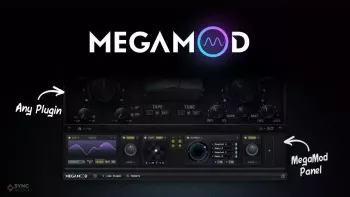
Sync Audio MegaMod is a revolutionary modulation plugin for Windows that snaps onto the bottom of any third-party plugin — instantly giving it a full, professional modulation system, even if that plugin has no modulation of its own. Every EQ you own becomes a fully morphable EQ. Every saturator becomes dynamic. Every reverb, compressor, or distortion gains powerful LFO, macro, envelope, and preset blending capabilities. MegaMod works by hosting another plugin inside itself — exposing all of its parameters for modulation — then dynamically resizing its panel to perfectly match the hosted plugin’s GUI, creating a single, completely unified interface with no extra windows and no clutter. The latest version is v0.8.0 (March 2026) which adds a new Envelope Follower, Cross Modulation between modules, and full automation recording support. Available in VST3, AAX, and Standalone for Windows 10+.
💡 Quick Summary
Sync Audio MegaMod Windows v0.8.0 — Snaps onto any VST3/AAX/AU plugin. Modulators: LFO, Macro Knob, XY Pad, Envelope Follower (new), Cross Modulation (new), Randomizer, Preset Blender. Full automation + automation recording (new). Dynamic panel resizes to match hosted plugin. No extra windows — unified interface. iLok not required. Online + offline registration. Standalone version included. VST3 + AAX. Windows 10+. Also macOS 10.11+ (Intel + Apple Silicon).
How MegaMod Works
01
Load MegaMod as an Insert
Place MegaMod on any channel in your DAW as a standard insert effect — just like loading any other plugin on Windows.
02
Load Any Plugin Inside It
Click Load Plugin, browse to a folder containing your plugins, and load any VST3, AAX, or AU plugin inside MegaMod on Windows — it hosts it internally.
03
Panel Snaps On Automatically
MegaMod’s modulation panel dynamically resizes to perfectly match the width of the hosted plugin — creating one unified interface with no extra windows on Windows.
04
All Parameters Are Exposed
Every controllable parameter of the hosted plugin is now accessible for modulation — EQ bands, saturation amount, reverb size, drive, pitch, anything on Windows.
05
Assign Modulators
Connect LFOs, macros, XY pads, envelope followers, or randomizers to any exposed parameter — drag and drop modulation routing on Windows.
06
Automate Everything
All modulation modules support full DAW automation and automation recording — every macro knob, LFO rate, and depth is automatable in your DAW on Windows.
Modulation Modules
〰️
LFO
Tempo-synced low-frequency oscillator — assign to any parameter to create rhythmic, sweeping movement. Sync to BPM for filter sweeps, tremolo, and more on Windows.
🎛️
Macro Knob
One macro knob controlling multiple parameters simultaneously — morph entire EQ curves, blend saturation and drive together, or control any combination of hosted plugin parameters on Windows.
✳️
XY Pad
Two-dimensional performance control — assign X and Y axes to different parameters for expressive real-time modulation and live performance on Windows.
📊
Envelope Follower NEW
Adds dynamic, transient-based modulation driven by the audio signal — perfect for transient-based saturation with Decapitator, formant shifting, or any dynamic creative effect on Windows.
🔗
Cross Modulation NEW
All modulation modules can now modulate each other — connect an LFO to control a macro rate, or let a randomizer vary the envelope follower depth for complex, dynamic movement on Windows.
🎲
Randomizer
Introduces variable, unpredictable modulation patterns — add organic randomness to any hosted plugin parameter for evolving, living sound design on Windows.
🔀
Preset Blender
Blend seamlessly between multiple presets of the hosted plugin — morph between completely different settings of any plugin in real time on Windows.
🤖
Automation Recording NEW
Full DAW automation support for all modulation modules — record macro movements, LFO rate changes, and more directly into your DAW’s automation lanes on Windows.
What You Can Do With MegaMod
🎚️
Morphable EQ Curves
Assign a macro to multiple EQ bands simultaneously — sweep entire frequency curves with one knob on any EQ plugin on Windows.
🔥
Dynamic Saturation
Use the Envelope Follower to drive saturation amount with transient energy — saturation that reacts to your audio on Windows.
🎵
LFO Pitch Shifting
Assign an LFO to any pitch parameter to create vibrato, chorus, or detuning effects on pitch shifters and synths on Windows.
🌊
Animated Reverb
Modulate reverb size, pre-delay, or mix with tempo-synced LFOs for evolving, rhythmic reverb textures on Windows.
🔁
Preset Morphing
Blend between completely different saved states of any plugin in real time — morph between two totally different reverb or EQ settings on Windows.
🎭
Live Performance Control
Use the XY Pad to control multiple plugin parameters simultaneously in live performance — expressive, hands-on control on Windows.
Version History
🆕 v0.8.0 — March 2026 (Latest)
+ New: Envelope Follower — dynamic transient-based modulation
+ New: Cross Modulation — all modules can now modulate each other
+ New: Full Automation + Automation Recording for all modules
✓ Fixed: Logic AU scanning — all 3rd party plugins now load properly
✓ Fixed: Crackling audio in FL Studio, Logic, and other DAWs
v0.7.x — February 23, 2026 (Initial Public Beta)
+ Initial release — LFO, Macro Knob, XY Pad, Randomizer, Preset Blender
+ Dynamic panel snap — auto-resizes to match any hosted plugin
+ Plugin hosting engine — exposes all hosted plugin parameters
+ Standalone version included
Plugin Formats — Windows
🎵 VST3 (64-bit)
🎵 AAX — Pro Tools (64-bit)
🖥️ Standalone Application
🍎 AU — macOS only
System Requirements — Windows
| Requirement |
Details |
| Operating System |
Windows 10 or later (64-bit) |
| Plugin Formats |
VST3, AAX (64-bit), Standalone |
| Version |
v0.8.0 — March 2026 (latest) |
| iLok |
Not required |
| Licensing |
Online and offline registration available |
| Also macOS |
macOS 10.11+ — VST3, AU, AAX — Intel + Apple Silicon |
| Standalone |
Included — Windows + macOS |
| Developer |
Sync Audio (syncaudio.io) |
Pros & Cons
✅ Pros
- ✓Works with literally any plugin — every plugin gains modulation
- ✓Dynamic panel snap — unified interface, zero clutter
- ✓New Envelope Follower — transient-driven modulation
- ✓Cross modulation — modules modulate each other
- ✓Full automation recording in all DAWs
- ✓Preset Blender — morph between plugin states in real time
- ✓iLok not required — easy activation
- ✓Standalone version included
- ✓User-driven development — community shapes future features
⚠️ Cons
- ✗Still in beta (v0.8.0) — expect occasional bugs
- ✗Plugin scanning requires manual folder setup
- ✗More modulators planned but not yet included
Frequently Asked Questions
What is Sync Audio MegaMod for Windows? ▾
Sync Audio MegaMod is a revolutionary modulation plugin for Windows (v0.8.0, March 2026) that snaps onto the bottom of any third-party plugin, instantly giving it a complete modulation system. It works by hosting another plugin inside itself, exposing all its parameters for modulation, then dynamically resizing its panel to match the hosted plugin’s GUI — creating one unified interface. Modulation modules include LFO (tempo-synced), Macro Knob (multi-parameter control), XY Pad (2D performance control), Envelope Follower (transient-based modulation), Cross Modulation (modules modulating each other), Randomizer, and Preset Blender (morph between plugin presets). Full DAW automation and automation recording supported for all modules. Available in VST3, AAX, and Standalone for Windows 10+. iLok not required. Online and offline registration available.
How does MegaMod snap onto other plugins on Windows? ▾
MegaMod works as a plugin host — you load MegaMod as a standard insert effect on a channel in your DAW, then click the Load Plugin button inside MegaMod to browse to a folder on your hard drive containing the plugins you want to use. When you load a plugin inside MegaMod, it appears in the upper half of the interface exactly as it normally would, and MegaMod’s modulation panel appears directly below it — snapped on seamlessly. MegaMod’s panel automatically resizes to perfectly match the width of the hosted plugin so it looks like a single, unified product. All the hosted plugin’s parameters are then exposed and available as modulation targets in MegaMod’s routing system on Windows.
What’s new in MegaMod v0.8.0? ▾
MegaMod v0.8.0 (March 2026) adds three major new features. The Envelope Follower is a new modulation source that adds dynamic movement driven by the audio signal’s amplitude — ideal for transient-based saturation, formant shifting on percussion, or any effect that should react to the incoming audio dynamically. Cross Modulation allows all modulation modules to modulate each other — for example connecting an LFO to control a Macro’s rate, or a Randomizer to vary an Envelope Follower’s depth, creating complex, organic modulation chains. Full automation and automation recording support means all modulation parameters can now be automated directly in your DAW’s automation lanes and recorded in real time. The update also fixes Logic AU plugin scanning and resolves crackling audio issues in FL Studio and Logic.
Download Sync Audio MegaMod Windows full version — modulation for any plugin, Envelope Follower, Cross Modulation, Preset Blender, LFO, Macro, XY Pad — v0.8.0!
🙏 I just ask for thank you, that's all.